So, it's been 6 months I've been developing this game, and I have not much to show for it. In my defense, I'm not "vibing" the code, I'm making it the old way, writing it and thinking about it myself. As always, free time (and the favorable mental state) sometimes boils down to just a couple of hours of a day or two in the week. Before we talk about the lib... if you are into PlayStation development and are just starting, let me give you a tip: Pcsx-redux is amazing, and the kit provided by Grumpycoders for VsCode is a gift sent from heaven. BUT, test your build on the real hardware if possible, or at least in a more strict emulator like no$psx. I had a NULL pointer bug in my code that pcsx-redux happily ignored, I just noticed it was wrong when I tried my build on an Android emulator and it was behaving weird. I'll make a post talking about it. Ah, another thing! If you are into learning how to do stuff the hardcore way, go NOW to Pikuma and buy the courses, the guy is amazing and my introduction to playstation programming is thanks to his amazing course on the topic, you can even notice that I totally steal some of his functions for my code :D Well, now, let's look at all that the D is capable of doing, with a brief explanation on why it exists :P
Each section here means a .c/.h pair, like animation.c/animation.h.
Animation:
It's still WIP, and barely tested, but, in theory, it is capable of supporting three-phase animations, where each animation has a start, an active and a recovery phase. This allows for animations like the classic NES Mega Man walk animation. To refresh, he first puts a foot and leans his body in the direction he is heading (that's the start phase), then he starts running and cycles the running frames (that's the active phase). In the end, when the player lets go of the button, he goes from the running frame to the foot leaning (just like the start phase) and then transitions to the idle animation. This is useful for other effects, like fighting games, the preparation for a blow, the blow and the cooling. An animation can be interrupted by another (based on a flag that explicitly tells the engine if this current animation can be interrupted) and, if the animation cannot be interrupted and a new one is issued by the game, it is chained as the "next" animation to be played. In terms of API, it exposes the following functions:
void updateAnimation(AnimationState * animation);
int changeAnimation(AnimationState * animationState, Animation * newAnimation);
void setAnimation(AnimationState * animationState, Animation * animation);
void syncAnimation(AnimationState * state, Animation * mirroredAnim);
void drawAnimation(AnimationState * animationState, StPoint * screenCoord, int hFlip);
The brain is updateAnimation. It's the one that checks the current animation being played, updates the phases, and keeps the animation state throughout the frames. The other functions are just helpers to avoid having to deal with the AnimationState directly. Also, draw, as expected, sends the current frame to the GPU.
Camera:
The camera system is simple, it follows an Entity, keeping it centralized as long as it can. The camera moves in a "rail", that I call cameraZone. These zones serve as boundaries the camera is allowed to roam. If it collides with these boundaries, it stops. I tried a LERP camera and also a windowed scheme, like Super Mario 3, but both looked wrong (because skill issues probably), and, for now, the camera is linear, the player moves 3 pixels, the camera moves the same to keep it centralized. It is possible to change targets at any time, but there is no soft walking between the old target and the new one. It will just jump and next frame the new target is the one being shown. To simulate something like a smooth camera pan, a "ghost" entity must be created and tracked until the destination, and then the new target is set. For what I envision for the game, this is fine :D This is done by these functions:
void setCamera(StCamera2D *, StStageInfo *, Entity * target);
void cameraSetTarget(StCamera2D *, Entity *, fixed offsetX, fixed offsetY);
void updateCamera(StCamera2D *, StStageInfo *);
void cameraClampToZone(StCamera2D *camera, StCameraZone *zone);
Clut animation:
This is a relic from the time I was making some demos to learn the PsyQ library and psx programming in general. The idea is a thing called an "StClut" which is a color palette created from either an array of 16bit colors or copying a CLUT that already exists in VRAM. It relies on dynamic memory allocations via malloc3 (which is bad) and allows for simple palette rotation, which, well, rotates the colors and sends them back to VRAM. Not proud of the malloc3 stuff. But I'll keep it in the code for now. It exposes the following functions:
StClut *createClut(int x, int y, int clutSize, unsigned short *initialColors);
StClut *createClutFromVram(int x, int y, int clutSize);
void rotateClut(StClut *clut, int start, int end);
inline void destroyClut(StClut *clut);
Collider:
For now, this is a simple x,y,w,h rect that supports AABB collision detection with an offset, if needed. Each animation frame can have one (default) or more colliders (a collection for each animation frame), so I can implement snake-like creatures without having to rely on a big collider which would result in a bad hitbox and also without resorting to pixel perfect (something I'm not considering for now, it's too cpu intensive and I don't think would make such a difference for the game). By now it only exposes one function, the collision solver:
FORCE_INLINE int checkCollision(Collider * a, StPoint * aOffset, Collider * b, StPoint * bOffset)
Color:
This is just a helper for now, that holds a StRGB struct to help me deal with colors and a function that converts from hsv to rgb color space, maybe this will be deleted, let it be for now. The hsv->rgb conversion is the only one provided, not rgb->hsv, as I'm not sure I'll even keep this one. This is also a left over from my learning demos.
void hsvToRgb(int h, int s, int v, StRGB * color);
Display:
This is a convenient wrapper around psyQ, dealing with the work of setting the video mode, creating and managing the double buffer in VRAM. Also it allows for creating a new DrawEnvironment, something you use to draw in the VRAM, which is useful to some special effects like saving the contents of the screen for further use as a texture. It exposes:
void screenInit(void);
void screenWipe();
u_short getCurrBuff(void);
DRAWENV *getCurrDrawEnv();
void enableBufferClearing();
void disableBufferClearing();
int bufferClearingEnabled();
void saveCurrDrawEnv();
void newDrawEnv(RECT *pos, StRGB *c, int clearFlag);
void displayFrame(void);
Draw utils:
As any other project, this is the utils file hehehe, more specifically graphics utils. This is where I maintain functions that draw stuff: point, line, quads... Most are nothing but convenient code to avoid setting up a GPU primitive by hand every time. Not much logic goes into it, just parameter processing and psyQ interfacing. I think I'll turn most of those into INLINE functions, but only after I have a real game stage to see if I really have bottlenecks due to a single jump instruction. I guess this will not happen, but who knows. This provides:
void setMaskState(int checkMask, int setMask);
void setTileClut(StPoint * clutPos);
void setOT(u_int ot);
void setTileTPage(u_int x, u_int y);
void drawTile16(StPoint * p, u_char tileNumber);
void drawQuad(RECT * rect, StRGB * c);
void drawQuadTexture(StQuadInfo * quadInfo);
void drawSemitransparentQuad(RECT * rect, StRGB * c, enAbrMode abr);
void drawQuadGSt(RECT * rect, StRGB * c1, StRGB * c2);
void drawQuadTexture3D(StObject * quadObj);
void drawPoint(StPoint * pos, StRGB * c);
void drawLine(StPoint * p1, StPoint * p2, StRGB * c1);
void drawLineGouraud(StPoint * p1, StPoint * p2, StRGB * c1, StRGB * c2);
void drawLineGSt(StPoint * p1, StPoint * p2, StRGB * c1, StRGB * c2);
void fillRectVRAM(RECT * rect, StRGB * c);
Entity:
An entity is basically anything that the player or the cpu can control and interact with the gameplay in some way or another. Every entity has a think and a draw function, which allows for entities that don't have a graphical representation, i.e. its draw function points to NULL, or entities that are purely cosmetic, it draws itself but doesn't collide, doesn't act or do anything meaningful. Since I'm using C (which lacks classes) and I want to go easy on the memory, I have a maximum of 128 entities. Looks small, but for a 256x240 game, that's more than enough. I might even lower this in the future. To further save ram, inside the entity struct I have a union, grouping together all the different types of entity attributes, so they all share the same storage, and each entity interprets the block as they need. By now, I have these functions being exposed:
void initEntitySystem();
void entityKill(Entity* e);
void updateEntitySystem();
void drawEntitySystem();
Entity* entitySpawn(eEntytyType type);
void entityJump(Entity* e);
Notice that jump is here. I'm not sure about it, but makes sense to me to separate the action of generic jump (acting on the vertical speed of the entity) from the specifics like playing jump sounds and such, so I provide a generic jump here and "children" entities can have their own playerJump() which calls entityJump and does their own thing. I might change my mind on that, but for now, it stays.
File:
It supports the reading of a file from the CDROM and does that by interfacing with the psyQ. Basically calling cdsearchfile, and sending a cdread command to get the file contents into a dynamically allocated buffer in memory. This too, I need to think about. Maybe in the future, when I have more information about my assets, I turn it into a static buffer for the file contents in a more organized ram layout, idk. It exposes just a function for reading and another that frees the buffer:
unsigned char *fileRead(char *filename, u_long *length);
void fileFree(char * fileBuffer);
Fixed point math:
Since the PlayStation cpu ships without a FPU, and to avoid software emulation, I have this fixed helper that deals with converting between integer and float to fixed and back. All functions here are forced inline, and I kept it as functions for debugging purposes. I might turn then into macros in the future. It exposes:
#define FixedToIntScaled(f, n)
#define IntToFixedScaled(i, n)
#define FixedAbs(x)
FORCE_INLINE fixed fixedAbs(fixed f)
FORCE_INLINE fixed toFixed(int integer)
FORCE_INLINE int toInt(fixed f)
FORCE_INLINE fixed toFixedFloat(float floatNumber)
FORCE_INLINE float toFloat(fixed f)
FORCE_INLINE fixed fixedMul(fixed a, fixed b)
FORCE_INLINE fixed fixedDiv(fixed a, fixed b)
Font rendering:
This is still WIP and by now it loads a single font into VRAM and lets you draw text using it. I intend to make it support multiple fonts. It exposes just two functions:
void initFont();
void textOut(const char * text, size_t textLenght, StPoint * pos, StRGB * c);
Joypad:
This is the interface with psyq controller input, it basically exposes the controller's buttons status and provides both level and edge triggering reads from the buttons. It also provides a struct that maybe should be in another place, it's called StControllerActionMap, which serves to map buttons to action, like instead of probing the pad one for the x button, I check joyPadJustReleased(input.JUMP). This way I can remap the buttons without changing the player input code. I just don't know if the joypad.h file is the right place for this, for now, it is :D It exposes:
void joyPadInit();
void joyPadReset();
#ifdef DEBUG
void joyPadWaitForRelease(u_long p);
#endif
FORCE_INLINE void joyPadUpdate()
FORCE_INLINE int joyPadCheck(int p)
FORCE_INLINE int joyPadJustPressed(int p)
FORCE_INLINE int joyPadJustReleased(int p)
Math utils:
Another "util" :D here is where I put stuff like my min, max, clamp macros, a definition for a point (both integer and fixed) and a fast(er) implementation of sin/cos functions (maybe I'll remove these after some tests with the ones provided by psyQ). I also define a macro to test if a point is inside a rect. It exposes just one function and some macros:
#define MIN(n,m)
#define MAX(n,m)
#define CLAMP(x, upper, lower)
fixed fsin(fixed i);
#define Fcos(i)
#define PointInRect(x,y, rx,ry,rw,rh)
Memory card:
It provides reading and writing to the memory card, it supports animated icons for the saved file. It uses psyq's libmcrd, the extended memory card library, instead of the lowlevel libcard. That's because I'm both lazy and dumb. I tried libcard but it's too much work for so little, the extended interface is way more humane to work with and, well, it works. There is one thing I want to do is to pass the icon as a parameter, it's a static fixed array by now. It exposes these functions:
void memCardSetup();
long memCardWrite(const char *fileName, unsigned long *data, unsigned int bytes);
long memCardRead(const char *fileName, unsigned long *data, unsigned int bytes);
void memCardCreateHeader(StCardHeader *header);
Ordering table:
This handles the table that let the GPU know the order to draw the primitives you sent to it. Since I'm making a 2D platformer game, and not a 2D engine, I put a small size to my OT, just 10 indexes are used, each corresponding to a layer in the gameplay area (with the main player layer resting at index 4, using a neutral camera setting). It handles the OT management and the inclusion of primitives in the list for each index in the OT. It exposes:
void emptyOT(u_short currbuff);
u_long *getOTAt(u_short currbuff, u_int i);
void resetNextPrim(u_short currbuff);
char *getNextPrim(u_int size);
Particle system:
Another leftover from my demos. This is a very simple particle system that uses the TILE_1 primitive to draw points for the particles. It defines some classes of particles, like, explosion, rain, blood... I'm not sure if I'll use it in the game, most of these can be done with an animation that looks better and I don't need to send dozens of primitives to the GPU just to make a blood splash. We'll see, it works, so it will be in the code for now. It exposes:
void initParticles();
void addParticle(u_short type, fixed x, fixed y);
void updateParticles();
void drawParticles();
Physics:
This is where the physics for an entity is done, basically collision with the map, slope handling and, next to be implemented, entity to entity collision solving. It is not "pure" in the sense that it talks to the stage to probe for the collision map and also knows about the collider present in the entities. So it's not a physics engine nor anything like it, I just called physics because it does the game's physics. It exposes two functions that takes an entity and test it against the map, if no collision is found, the vertical or horizontal velocity of the entity is added to its x,y coordinates:
void doVerticalPhysics(Entity * e);
int doHorizontalPhysics(Entity * e);
Now I need to provide a way for an entity to test for collision against the other entities.
Player:
This is very much not generic and doesn't deserve to be talked about here (especially since position coordinates are saved in tile units and handled as fixed-point numbers anyway). In another post I can delve into the player code.
PsyQ MASK primitive:
This is something missing from the PsyQ for reasons I cannot understand. The GPU is capable of processing a MASK primitive that enables the programmer to mask certain pixels in the buffer as not writable, allowing for some sort of stencil buffer implementation. I read about it in the amazing PlayStation Specifications by Martin Korth (Aka nocash). Since I made a demo using it, I created a new primitive that can be sent to the gpu with addPrim(from libgpu). I don't use it for now, and maybe will not use at all, but until I finish the game, let it close. It's a cool trick, albeit hard to do correctly as it is very dependable on the order of the drawing, it's not a thing you use easily, it demands serious planning.
ScratchPAD:
I don't have a good use case for it, but hey, it's 1KB of fast ram, I might find a good use, idk. It exposes a function that basically takes the buffer passed as parameter and copies it to the memory map used by the scratch pad:
void copyToScratchPad(u_char * buffer, u_int size);
Sound:
This handles lots of sounds related stuff, like playing CDDA, XA(it supports looping from any two time points), raw data SEQ files and sequence bank files (VAB banks). It also allows for reverb effects to be used. This module is an amalgamation of all the audio demos I made while learning psyQ. For the Dridax game, I think no raw buffers or standalone SEQ files will ever be used, just XA audio for background music, a VAB bank for sounds effects and maybe, maybe a CDDA track to be the credits song and allow the end song to be playable on a real CD player sound system. It exports a shit ton of functions:
//GENERAL
void soundInit(void);
void initVoice(u_long voicechannel, u_short pitch);
void audioPlay(int voicechannel);
void audioPause(int voicechannel);
void setVoicePan(int voicechannel, int pan); // voice channel here is from 0 to 23
//VAG
u_char *loadVAGSound(char *filename, u_long *length);
void transferVAGToSpu(u_char *data, u_long length, int voicechannel, u_short pitch);
//VAB
void loadVabBank(StVabFiles * vabBank);
void playVabProgram(long program, long pitch);
void stopVabProgram(long program, long pitch);
//XA
void setupXAPlay();
void disableXAPlay();
void playXAAudioTrackLoop(StTrackPlay * trackInfo);
int getXACurLoc();
//CDDA
void playCDDAAudioTrack(int * trackarray, E_CDDA_MODES mode);
int getCDDACurLoc(int * trackarray);
//SEQ
short loadSeqSound(StSeqFiles * seqMusic);
void playSeq(short seq);
void stopSeq(short seq);
void pauseSeq(short seq);
void resumeSeq(short seq);
// REVERB
long reverbMode();
void initReverb(u_long voice);
void setReverb(u_long voice, u_long mode);
void endReverb(u_long voice);
Sprites:
A sprite is composed of one or more sprite parts, with each sprite having a collider (or none). This represents a high level sprite in the screen, while a sprite part is more of a texture in VRAM that can be combined to give life to a full sprite. Sprite parts are drawn with an offset from the base sprite x,y coordinates. Most of the sprite composition is a data problem, i.e. how to assemble it from the pieces. The only function the module exposes is the one that draws the sprite:
void drawSprite(Sprite * sprite, StPoint * screenCoord, int hFlip);
I'm thinking of combining texture and sprite into a single module, but idk, a texture can be used to be the background of the main menu, it's not exactly a sprite... for now, as usual hahahah they'll remain separate things.
Stage:
This module loads a stage from the CDROM and manages the camera zones and the information on the tiles and collision map as well. This is very Dridax specific and will be dealt with in another post. It supports up to four parallax layers. Each layer's tiles occupy a texture page with two CLUTs, making a total of 32 colors per layer. It supports a single collision map that spans the whole stage area. The state file also holds the definition of the camera zones and enemy placement. It informs which background XA file to play, the loop points and what the VAB bank is for this specific stage (the engine loads a default bank with commonly used sounds and allows each stage to load a VAB containing sounds that happen only in this stage)."
STR play:
This module plays a STR video file. This is mostly the original Sony sample code to play str that Lameguy64 organized and I modified for my needs, which are:
- What Killocan did to Lameguy code?
> Playback fixed to be 16bpp only.
> Moved memory management from stack to heap (malloc3)
> Moved the frame processing code from the interruption function to a function that is called whenever the ready flag from the interruption is true.
The first one is a design decision, so I fixed it to play 16bpp, not 24bpp files. I also moved the HUGE buffer that was placed on the stack to be on the heap, it was too big to be on the stack for a real game to use. The last modification I did because Lameguy's code had too much work being done inside an interruption function. Maybe it's my MSDOS days talking to me, but I find it not optimal to have too much code inside an interrupt handler, so I set a flag and let the main loop handle the heavy work if needed. It exposes only one function that plays a file from the CD:
int PlayStr(int xres, int yres, int xpos, int ypos, STRFILE *str);
It's important to notice that this completely overrides the contents of the VRAM rect it uses to display the video, which is the rect from 0,0 to 320,480.
Texture:
This is a generic texture, it can be clut indexed or truecolor. This module provides functions to read a texture from the CD and to send it to the VRAM. The functions exposed are:
void loadTexture(const char *filename, StTextureInfo *textureInfo);
void sendTextureToVRAM(StTextureInfo *textureInfo, u_long offset);
Utils:
The last "utils"!!! This one, for now, keeps two implementations of itoa for base 10, a fast one and a "regular" one, that is faster than the libc alternative, since it only handles base 10. This is missing from the libc present in the PlayStation BIOS, but is a must, so, that's why we have one. The fast one may be deleted, I need to test if this will be anything close to a bottleneck to decide. It exposes:
void sitoa10(char *const buffer, u_int bufferSize, u_int number10);
char* fastItoa10(int value, char* str);
And that's it, here is a video with some of what it can do:
███╗ ███╗ ██████╗ ██████╗ ███████╗ ██╗██████╗ ██╗ ██╗████╗ ████║██╔═══██╗██╔══██╗██╔════╝ ███║╚════██╗██║ ██║██╔████╔██║██║ ██║██║ ██║█████╗ ╚██║ █████╔╝███████║██║╚██╔╝██║██║ ██║██║ ██║██╔══╝ ██║ ╚═══██╗██╔══██║██║ ╚═╝ ██║╚██████╔╝██████╔╝███████╗ ██║██████╔╝██║ ██║╚═╝ ╚═╝ ╚═════╝ ╚═════╝ ╚══════╝ ╚═╝╚═════╝ ╚═╝ ╚═╝/* Creating shitty games & comics since 1998 */
I'm lazy, and I honestly hate battling my computer just to get stuff done. So I went the easy way here. I'm using VS Code with the PSX.Dev extension by Grumpycoders. It comes with most of the necessary tools (compilers, a debugging-capable emulator, linker, etc.) to generate a PlayStation program, plus the tools from the Sony PsyQ SDK. The alternative would be using an old computer running Windows 95/98 or emulating it in some kind of virtual machine setup, which comes with all kinds of limitations on file sharing, internet access (for Git), and so on. Also, the original solution uses an older compiler, which isn’t as good as the one used by PSX.Dev. Sure, it would make it easier to work with Sony tools made for Windows 95, but most of them still work on Windows 10, and for the few that don’t, I use DOSBox. My setup is a desktop running Ubuntu (again, lazy...) and a notebook with Windows 10. I don’t use Copilot, not because I think I can do better (I’m a pretty bad programmer), but because, like with my comics, I like to use my own brain. It’s all I have, all I am... I don’t want it to waste away. I’ll probably have to use Copilot (or something like it) at my job soon just to keep up, but for my hobbies, I prefer doing things myself. Back to the dev setup... most of the tool usage happens on the notebook, for no real reason other than I haven’t configured Wine to run everything on the Linux machine. On the PSX hardware front, I have four. A real collector would probably laugh at me, but it’s enough to raise eyebrows from regular folks :D Each one has a different bypass to allow it to run homemade ISOs. Here is my happy drawer:
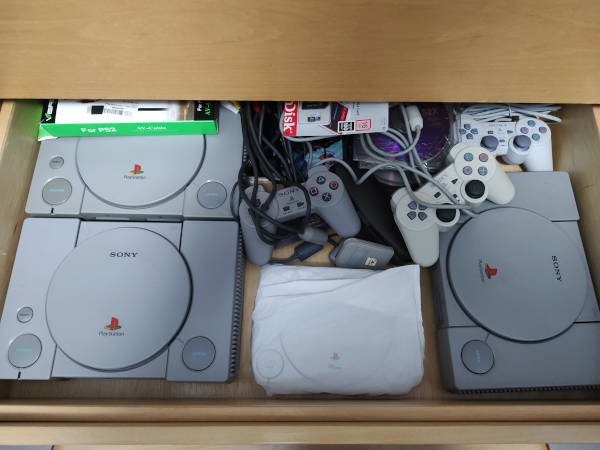
Apart from the PsyQ tools, I use mkpsxiso to create disk ISOs, GIMP for graphics, VirtualDub for video, and Audacity for audio. For documentation, I rely heavily on the official PsyQ docs and the NOCASH hardware/programming specs. And... that’s it. Thanks, I promise to try to bring real programming to my posts soon.
Here comes a new comic! Sort of. I've been cooking this one in my mind for quite some time. Despite not looking like it, I do have the whole Adrift saga in my head, I just don't have time to write it all down. Actually, the biggest problem is not time. It's money! I chose to tell it through a medium I'm not good at making by myself, which is comics (I'm not good at writing either, but I can do it, unlike drawing good comic book art). I don't have money to pay all the artists needed to draw those comics, so I only write stories when I'm close to being able to start the process of taking the raw material and turning it into drawing drafts, thinking about camera angles and all that. Well, that being said, this is the raw brain-dump of this little adventure about Ghaks. It's short, for adults, and advances the plot of the saga a little. Feel free to take a look. I would love to receive feedback on it, btw. It's written in a mix of Brazilian Portuguese and "Brazilian English" :D Because it's easier to communicate with local artists this way. Download
I know, this blog is supposed to be about gamedev but, since Dridax makes its debut in Orbi's comics, I think it's only fair to announce here that we finally finished it! It took quite a long time. It began in 2020 and extended all the way to today. Not a laziness problem, I assure you! It's a big comic, with over 450 pages, and was made while other comics were being produced. And maybe, just maybe, I had the tendency to redo a page many times over until I deemed it finished :D Ah! A pandemic happened too... Anyway, it's finished! And you can read it for free at: READ IT! PLS :) Go on and take a look! While you might not like the writing, as I'm just a bad programmer telling stories, you can be sure that the art is spectacular!
It's been a while since I last tried to have some sort of blog of my own. I'm not very much into the medium, and personally I don't think I have anything worthwhile to share. Despite all that, I'm creating a PlayStation 1 game and decided to document its creation. It's true that retro game development is not that popular, but it's also true that this is probably why I like it so much. It's this lack of a spotlight and the profound admiration I have for the old timers that created amazing games with so little, comparatively, in terms of hardware and software. So... this is my journey on creating Dridax's Escape, a game that belongs to the Adrift space opera, a comics project I've been writing since 2019, with the help of many artists to transform my words into pictures. I must warn you that I'm not an expert on PlayStation development. Any of my ideas and implementations are most definitely far away from the gold standard, but I hope that this might serve as some sort of encouragement. If I can do it, so can you!
killocan@gmail.com
EOF